Watercolor Christmas Elements Clipart700: A Practical Guide to Elevating Your Holiday Designs
Creating a cohesive and elegant holiday aesthetic requires more than just slapping red and green colors onto a page. It demands texture, depth, and a touch of artistic authenticity. This is where Watercolor Christmas Elements Clipart700 becomes an invaluable asset for designers, small business owners, and hobbyists alike. Unlike rigid vector graphics that can sometimes feel sterile or overly digital, hand-painted watercolor elements bring a softness and organic warmth that resonates deeply with audiences during the festive season.
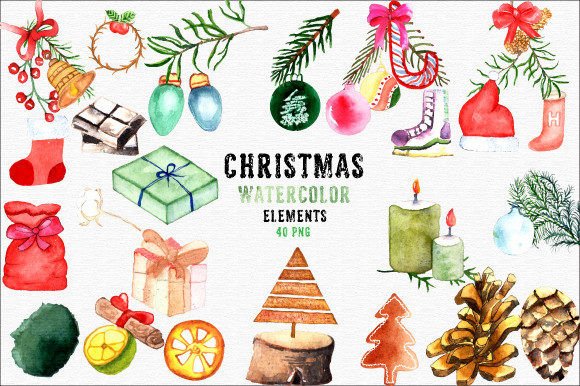
This specific collection consists of watercolor leaf and decorative elements designed to help you create elegant Christmas designs. Each piece was created by hand and then carefully converted to a digital file, ensuring that the unique brushstrokes and subtle color variations of traditional art are preserved in a convenient digital format. Whether you are designing party invitations, planner stickers, or high-end packaging, understanding how to leverage these assets effectively can significantly enhance the perceived value of your projects.
Understanding the Value of Hand-Painted Digital Assets
One common misconception among beginners is that all clipart is created equal. In reality, there is a distinct difference between mass-produced vector illustrations and hand-drawn watercolor assets. The latter offers a level of nuance—such as pigment bleeding, paper texture simulation, and imperfect edges—that vectors often lack. When you use Watercolor Christmas Elements Clipart700, you are incorporating a piece of artisanal quality into your work, which can be a deciding factor in whether a design feels premium or generic.
However, simply having access to high-quality images is not enough. Many users overlook the technical specifications required to maintain this quality throughout the production process. For instance, knowing that you will receive 40 PNG files at 2000x2000 pixels with 300 DPI and transparent backgrounds is crucial. These specifications ensure that the images are print-ready for physical goods like wrapping paper, tags, and labels, while also being sharp enough for digital use on websites and social media. Ignoring these details can lead to pixelation or unwanted white boxes around your designs, ruining the seamless integration of the watercolor effect.
Common Pitfalls in Using Watercolor Clipart
Even experienced creators can stumble when integrating watercolor elements into larger compositions. One frequent mistake is ignoring the aspect ratio and resolution constraints of different mediums. While 2000x2000 pixels is excellent for most uses, attempting to scale these elements up for massive billboards or large-format banners without proper vectorization tools can result in blurry outputs. Conversely, using them at tiny sizes for intricate blog icons might lose the delicate detail that makes watercolor appealing. The key is to match the element size to the output medium.
Another oversight involves the background transparency. Although the files come with transparent backgrounds, some editing software may interpret alpha channels differently depending on the layer mode used. If you place a watercolor leaf over a dark background but forget to adjust the blending mode or check for residual anti-aliasing halos, you may end up with a faint white outline around the leaves. This detracts from the "hand-painted" illusion and makes the graphic look pasted on rather than integrated. Always preview your design at 100% zoom before finalizing any print or digital asset.
Furthermore, many users fail to consider color harmony. Watercolor pigments have natural variations; a single leaf might shift from deep emerald to muted olive. When combining multiple elements from Watercolor Christmas Elements Clipart700, it is easy to create a cluttered or muddy palette if you do not plan the color scheme beforehand. It is advisable to select a limited number of elements that complement each other’s undertones rather than grabbing random items from the set. This approach ensures a unified look across diverse applications, from business cards to website headers.
Strategic Applications for Maximum Impact
To avoid wasted effort and ensure satisfaction, it is helpful to categorize potential uses based on the strengths of the clipart. The versatility of these 40 PNG files allows for a wide range of applications, but some yield better results than others.
- Print Materials: The 300 DPI resolution makes these files ideal for physical products. Use them for scrapbooking, planner stickers, and postcards. Because the images are high-resolution, they will reproduce beautifully on matte or glossy paper stocks. For wrapping paper and packaging, repeat patterns can be created easily due to the clean transparent edges, allowing the watercolor motifs to blend seamlessly.
- Digital Branding: For entrepreneurs and bloggers, these elements add personality to blog design, websites, and social media graphics. They are perfect for creating custom business cards or labels for handmade goods. The soft aesthetic helps break up text-heavy layouts and draws the eye to key information without overwhelming the viewer.
- Textile and Decor: If you are involved in fabrics and textiles, sublimation, or home decoration, these watercolor elements provide a trendy, bohemian-chic vibe. They work well on throw pillows, curtains, or apparel. However, remember that fabric printing requires careful consideration of ink absorption, so test prints are recommended before bulk production.
Pre-Purchase and Pre-Use Checklist
Before integrating Watercolor Christmas Elements Clipart700 into your workflow, take a moment to verify a few practical details. First, confirm the licensing terms. Ensure that the commercial rights align with your intended use, especially if you plan to sell physical products featuring these designs. Some creators allow unlimited personal use but restrict commercial resale unless a specific license is purchased.
Secondly, check your software compatibility. PNG files are widely supported, but advanced features like transparency might behave differently in older versions of design software. If you are using free or basic editing tools, ensure they support alpha channels properly. Additionally, consider organizing your files immediately upon download. Creating folders for "Leaves," "Ornaments," and "Borders" within the set can save significant time during the creative process.
Finally, think about your end goal. Are you aiming for a rustic, vintage feel or a modern, minimalist holiday theme? The hand-drawn nature of these elements leans toward the former, but their clean digital conversion allows for modern styling too. By planning your composition and respecting the technical limitations of the medium, you can avoid costly reprints and disappointing digital renders. With careful application, Watercolor Christmas Elements Clipart700 can transform ordinary projects into memorable, elegant experiences that capture the true spirit of the season.